This article is part of the “Quarkus for Spring Developers” series.
In the previous article, we explored the Vert.x Event Bus and saw how @ConsumeEvent solves runtime decoupling. But the Event Bus has a limitation: string-based resolution without type safety. Quarkus 3.36 brought a natural evolution: Quarkus Signals.
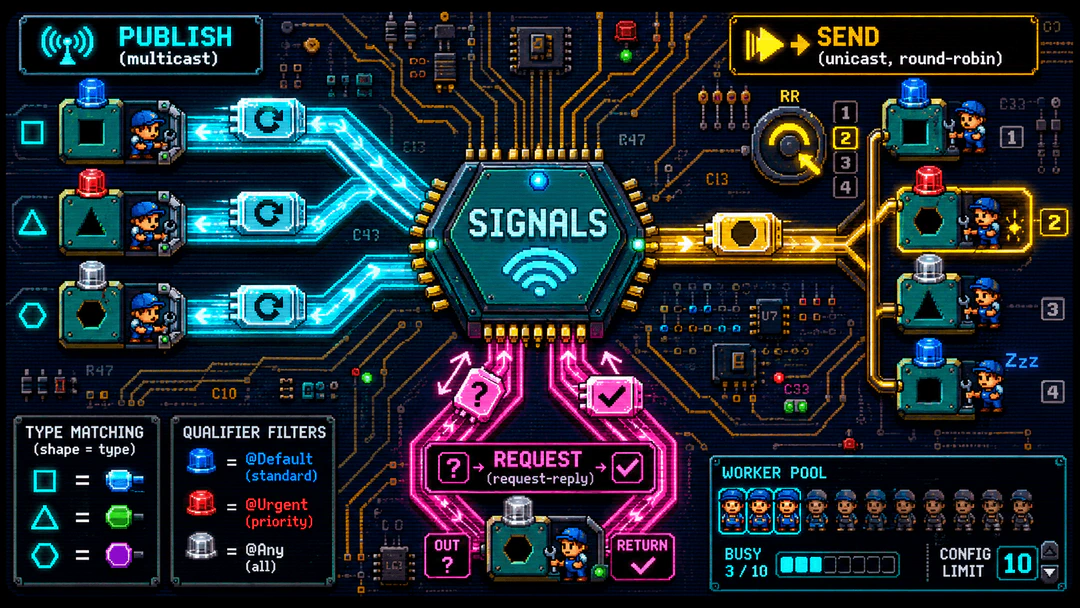
Signals is an experimental extension that elevates in-process messaging to a new level: type-safe resolution inspired by CDI events, qualifiers for filtering, flexible execution model (blocking, non-blocking, virtual threads), and native support for pub/sub, unicast, and request-reply. All without external infrastructure dependencies.
In this article, we’ll build the same order system from the previous article, but now with Signals. By the end, you’ll understand why Signals is the natural direction for in-process messaging in Quarkus, and when it makes sense over the Event Bus.
1. The Problem: Runtime Coupling
Imagine that when saving an order, you need to:
- Persist the order in the database
- Send a confirmation email
- Notify inventory
- Update a dashboard
In Spring, the first tool that comes to mind is ApplicationEventPublisher:
// SPRING
@Service
public class OrderService {
    private final ApplicationEventPublisher publisher;

    OrderService(ApplicationEventPublisher publisher) {
        this.publisher = publisher;
    }

    @Transactional
    public Order create(Order order) {
        Order saved = repository.save(order);
        publisher.publishEvent(new OrderCreatedEvent(saved));
        return saved;
    }
}
It works, but there’s a detail that catches many people off guard: by default, @EventListener runs on the same thread and within the same transaction as the publisher. If the listener is slow, the client waits. If it throws an exception, you might roll back the transaction that already saved the order. To make the listener asynchronous, you need @Async (and configure an executor), and for anything more serious (guaranteed delivery, queues, broadcast between services), the path leads to Spring Integration, Spring Cloud Stream, or Kafka. That’s a lot of infrastructure for a problem that is often local to the application.
2. Quarkus Signals: The Native Solution
Quarkus 3.36 introduced Signals, an experimental extension that solves the decoupling problem with a type-safe approach. While the Event Bus uses strings as addresses, Signals uses the object type and qualifiers to determine who receives what.
What are Signals?
A signal is a Java object (preferably immutable) that is emitted by one component and delivered to one or more receivers. The resolution is inspired by CDI events, but with native support for multiple delivery patterns:
| Pattern | Description | When to use |
|---|---|---|
| Publish (Multicast) | The signal is delivered to all receivers matching the type and qualifiers | Broadcast notifications |
| Send (Unicast) | The signal goes to a single receiver, selected round-robin | Exclusive processing, no response |
| Request (Request-Reply) | A single receiver receives and responds asynchronously | Queries and validations |
Signals vs Event Bus
| Aspect | Event Bus | Signals |
|---|---|---|
| Resolution | Strings (addresses) | Type-safe (object type) |
| Qualifiers | Not supported | Supported (@Default, @Any, custom) |
| Execution model | Event loop (default) | Blocking (default), flexible |
| Request-reply | Uni<T> or CompletionStage<T> | Native return type |
| Status | Consolidated | Experimental (Quarkus 3.36+) |
About experimental status: Signals is new (May 2026), but already functional and ready for production use. The API may undergo minor adjustments, but the fundamental concepts are consolidated. The Event Bus continues to work and will be supported indefinitely.
3. Installation
To add Quarkus Signals to your project:
CLI:
quarkus extension add quarkus-signals
Maven:
./mvnw quarkus:add-extension -Dextensions='quarkus-signals'
Or add directly to pom.xml:
<dependency>
    <groupId>io.quarkus</groupId>
    <artifactId>quarkus-signals</artifactId>
</dependency>
4. Creating a Signal Object
A signal is a Java object that carries data between components. It should be immutable or thread-safe, as it may be accessed from multiple threads.
Using Records (Recommended)
public record OrderCreated(String orderId, String customerName, double totalAmount) {}
Records are immutable by nature, ideal for signals.
With Qualifiers
To distinguish between different kinds of signals of the same type, use qualifiers:
@Qualifier
@Retention(RUNTIME)
@Target({PARAMETER, FIELD})
public @interface Urgent {
    public static final class Literal extends AnnotationLiteral<Urgent> implements Urgent {
        public static final Literal INSTANCE = new Literal();
        private static final long serialVersionUID = 1L;
    }
}
5. Emitting Signals
The entry point for emission is the Signal<T> interface, injected as a CDI bean:
@Inject
Signal<OrderCreated> orderCreatedSignal;
Emission Modes
Publish (Multicast) - Fire-and-forget
orderCreatedSignal.publish(new OrderCreated("123", "Matheus", 150.0));
Delivers the signal to all receivers matching the type.
Send (Unicast) - Round-robin
orderCreatedSignal.send(new OrderCreated("123", "Matheus", 150.0));
Delivers the signal to a single receiver, selected round-robin.
Request (Request-Reply) - With response
// Blocking
String confirmation = orderCreatedSignal.request(
    new OrderCreated("123", "Matheus", 150.0), String.class);

// Reactive
Uni<String> confirmation = orderCreatedSignal.reactive().request(
    new OrderCreated("123", "Matheus", 150.0), String.class);
Delivers the signal to a single receiver and waits for the response.
Adding Metadata
orderCreatedSignal
    .withMetadata("traceId", "abc-123")
    .withMetadata("source", "web")
    .publish(new OrderCreated("123", "Matheus", 150.0));
No Matching Receiver
If no receiver matches the emitted signal:
publish()andsend()succeed silently - no error is raisedrequest()returnsnullreactive().publish(),reactive().send()andreactive().request()complete with anullitem
This is different from Event Bus, where request() would throw a ReplyException.
Lazy Uni Semantics
The Uni returned by reactive().publish(), reactive().send(), and reactive().request() is lazy: no signal is emitted until the Uni is subscribed. Each subscription triggers a new, independent emission:
Uni<Void> uni = orderCreatedSignal.reactive().publish(new OrderCreated("123", "Matheus", 150.0));
// No signal has been emitted yet

// First subscription - emits the signal
uni.await().indefinitely();

// Second subscription of the same Uni - emits the signal again
uni.await().indefinitely();
Error Handling
For blocking emission methods (publish(), send(), and request()):
- Receiver failures from
publish()andsend()are logged but not propagated to the caller - For
request(), the receiver’s exception is thrown directly on the calling thread
For reactive emission methods (reactive().publish(), reactive().send(), and reactive().request()):
- The failure is propagated through the returned
Uni - For
sendandrequest(unicast), the receiver’s exception is propagated directly - For
publish(multicast), where multiple receivers may fail, the failures are wrapped inio.smallrye.mutiny.CompositeException
6. Receiving Signals
The @Receives annotation marks a method as a signal receiver. It’s the equivalent of Event Bus’s @ConsumeEvent, with a crucial difference: type-safe resolution.
Spring: @EventListener
// SPRING
@Component
public class OrderEventHandler {

    @EventListener
    public void onOrderCreated(OrderCreatedEvent event) {
        // Same thread and same transaction as publisher.
        emailService.send(event.getOrder());
    }
}
Quarkus Signals: @Receives
// QUARKUS SIGNALS
@ApplicationScoped
public class NotificationHandler {

    private static final Logger LOG = Logger.getLogger(NotificationHandler.class);

    void onOrderCreated(@Receives OrderCreated order, EmailService emailService) {
        // Runs on a separate thread (blocking by default).
        LOG.infof("Sending email for order %s to %s", order.orderId(), order.customerName());
        emailService.send(order);
    }
}
Note the differences:
@Receivesinstead of@ConsumeEvent- Additional parameters are automatically injected (CDI)
- Execution model: blocking by default (unlike Event Bus which is event loop)
- Type-safe: the parameter type determines which signal is received
Execution Model
The execution model is determined by the annotation on the method or class:
// Blocking (default for void)
void onOrder(@Receives OrderCreated order) { /* worker thread */ }

// Non-blocking
@NonBlocking
void onOrder(@Receives OrderCreated order) { /* event loop */ }

// Virtual Thread
@RunOnVirtualThread
void onOrder(@Receives OrderCreated order) { /* virtual thread */ }
Golden rule: If the method returns
voidor a non-reactive type, the default isBLOCKING. If it returnsUniorCompletionStage, the default isNON_BLOCKING.
Qualifiers
Qualifiers enable signal filtering:
// Receives only OrderCreated with @Default qualifier
void onOrder(@Receives OrderCreated order) { /* ... */ }

// Receives only OrderCreated with @Urgent qualifier
void onUrgentOrder(@Receives @Urgent OrderCreated order) { /* ... */ }

// Receives ALL OrderCreated (any qualifier)
void onAnyOrder(@Receives @Any OrderCreated order) { /* ... */ }
CDI difference: In CDI, an observer without a qualifier receives any event of the type. In Signals, a receiver without a qualifier receives only signals with
@Default.
SignalContext
To access metadata, qualifiers, and emission type:
void onOrder(@Receives SignalContext<OrderCreated> ctx) {
    OrderCreated order = ctx.signal();
    Map<String, Object> metadata = ctx.metadata();
    Set<Annotation> qualifiers = ctx.qualifiers();
    SignalContext.EmissionType emissionType = ctx.emissionType();
}
Request Context
Each receiver execution is associated with a new CDI request context. This means that @RequestScoped beans injected into the receiver method or used by the bean that declares the receiver are unique to that particular invocation:
@ApplicationScoped
public class OrderHandler {

    void onOrder(@Receives OrderCreated order, MyScopedBean bean) {
        // MyScopedBean is @RequestScoped: unique to this invocation
    }
}
7. Direct Comparison
| Aspect | Spring @EventListener | Quarkus Signals @Receives |
|---|---|---|
| Default thread | Same as publisher | Worker thread (blocking) |
| Publisher transaction | Shared (can be affected) | Isolated |
| To make async | @Async + executor | Already async by default |
| Qualifiers | No | @Default, @Any, custom |
| Request-reply | Not native | Native return type |
| Fire-and-forget | void | void |
| Type-safe | Yes | Yes (stronger than Event Bus) |
8. Practical Project: Order System with Notification
Let’s build a complete, functional example. When saving an order, we dispatch a signal to multiple handlers.
Dev Services in action: The project uses
quarkus-rest-jackson,quarkus-hibernate-orm-panache, andquarkus-jdbc-postgresql. Without any datasource configuration, Dev Services automatically starts a PostgreSQL container in dev and test.
Project Structure
signals-demo/
  src/main/java/org/acme/
    Order.java
    OrderDTO.java
    OrderCreated.java
    OrderService.java
    NotificationHandler.java
    StockHandler.java
    DashboardHandler.java
    OrderResource.java
  src/main/resources/
    application.properties
  src/test/java/org/acme/
    OrderResourceTest.java
Order.java
@Entity
@Table(name = "orders")
public class Order extends PanacheEntity {

    @Column(name = "customer_name", nullable = false)
    public String customerName;

    @Column(name = "total_amount", nullable = false)
    public double totalAmount;

    @Column(nullable = false, updatable = false)
    public LocalDateTime createdAt;

    @PrePersist
    void onCreate() {
        createdAt = LocalDateTime.now();
    }
}
OrderDTO.java
public class OrderDTO {

    @NotBlank(message = "Customer name is mandatory")
    public String customerName;

    @Positive(message = "Total amount must be positive")
    public double totalAmount;
}
OrderCreated.java
public record OrderCreated(String orderId, String customerName, double totalAmount) {}
OrderService.java
@ApplicationScoped
public class OrderService {

    private static final Logger LOG = Logger.getLogger(OrderService.class);

    final Signal<OrderCreated> orderCreatedSignal;

    OrderService(Signal<OrderCreated> orderCreatedSignal) {
        this.orderCreatedSignal = orderCreatedSignal;
    }

    @Transactional
    public Order create(OrderDTO dto) {
        Order order = new Order();
        order.customerName = dto.customerName;
        order.totalAmount = dto.totalAmount;
        order.persist();
        LOG.infof("Order %d persisted for customer: %s", order.id, order.customerName);

        orderCreatedSignal.publish(new OrderCreated(
            String.valueOf(order.id), order.customerName, order.totalAmount));
        LOG.info("Signal 'OrderCreated' dispatched asynchronously");

        return order;
    }

    public List<Order> listAll() {
        return Order.listAll(Sort.by("createdAt").descending());
    }

    public Optional<Order> findById(Long id) {
        return Order.findByIdOptional(id);
    }

    @Transactional
    public boolean delete(Long id) {
        return Order.deleteById(id);
    }
}
Note that we use publish() (multicast) because we want multiple handlers to receive the signal.
NotificationHandler.java
@ApplicationScoped
public class NotificationHandler {

    private static final Logger LOG = Logger.getLogger(NotificationHandler.class);

    void onOrderCreated(@Receives OrderCreated order) {
        LOG.infof("Confirmation email sent to %s for order %s (total: $%.2f)",
            order.customerName(), order.orderId(), order.totalAmount());
    }
}
StockHandler.java
@ApplicationScoped
public class StockHandler {

    private static final Logger LOG = Logger.getLogger(StockHandler.class);

    void onOrderCreated(@Receives OrderCreated order) {
        LOG.infof("Inventory reserved for order %s", order.orderId());
    }
}
DashboardHandler.java
@ApplicationScoped
public class DashboardHandler {

    private static final Logger LOG = Logger.getLogger(DashboardHandler.class);

    void onOrderCreated(@Receives OrderCreated order) {
        LOG.infof("Dashboard metrics refreshed for order %s", order.orderId());
    }
}
OrderResource.java
@Path("/orders")
public class OrderResource {

    private static final Logger LOG = Logger.getLogger(OrderResource.class);

    final OrderService service;

    OrderResource(OrderService service) {
        this.service = service;
    }

    @POST
    public Response create(@Valid OrderDTO dto) {
        LOG.info("Creating new order");
        Order created = service.create(dto);
        return Response.status(Response.Status.CREATED).entity(created).build();
    }

    @GET
    public List<Order> list() {
        return service.listAll();
    }

    @GET
    @Path("/{id}")
    public Order get(@RestPath Long id) {
        return service.findById(id)
                .orElseThrow(NotFoundException::new);
    }

    @DELETE
    @Path("/{id}")
    public void delete(@RestPath Long id) {
        if (!service.delete(id)) {
            throw new NotFoundException();
        }
    }
}
9. Tests
Integration Tests
@QuarkusTest
class OrderResourceTest {

    @Test
    void testCreateOrder() {
        given()
            .contentType(ContentType.JSON)
            .body("{\"customerName\":\"Matheus\",\"totalAmount\":150.0}")
          .when().post("/orders")
          .then()
             .statusCode(201)
             .body("id", notNullValue(),
                   "customerName", is("Matheus"));
    }

    @Test
    void testListOrders() {
        given().when().get("/orders").then().statusCode(200);
    }

    @Test
    void testGetOrderNotFound() {
        given().when().get("/orders/9999").then().statusCode(404);
    }

    @Test
    void testDeleteOrder() {
        String orderId = given()
            .contentType(ContentType.JSON)
            .body("{\"customerName\":\"To Delete\",\"totalAmount\":50.0}")
          .when().post("/orders")
          .then().statusCode(201)
            .extract().path("id").toString();

        given().when().delete("/orders/" + orderId).then().statusCode(204);
    }
}
Verifying Async Receivers
Since we use publish() (fire-and-forget), the HTTP response returns before the handlers run. To verify that handlers were called, combine @InjectSpy (it spies on the real bean, which still runs) with Awaitility:
@InjectSpy
NotificationHandler notificationHandler;

@Test
void testNotificationHandlerCalled() {
    given()
        .contentType(ContentType.JSON)
        .body("{\"customerName\":\"Matheus\",\"totalAmount\":150.0}")
      .when().post("/orders")
      .then().statusCode(201);

    await().atMost(5, SECONDS).untilAsserted(() ->
        Mockito.verify(notificationHandler).onOrderCreated(any()));
}
Unit Tests with @InjectMock
@QuarkusTest
class OrderServiceTest {

    @InjectMock
    Signal<OrderCreated> orderCreatedSignal;

    @Inject
    OrderService orderService;

    @Test
    void testCreateOrderPublishesSignal() {
        OrderDTO dto = new OrderDTO();
        dto.customerName = "Matheus";
        dto.totalAmount = 150.0;

        orderService.create(dto);

        Mockito.verify(orderCreatedSignal).publish(any(OrderCreated.class));
    }
}
Running ./mvnw test, the tests pass and the logs show thread separation:
INFO  [org.acme.OrderService]        (executor-thread-1) Order 1 persisted for customer: Matheus
INFO  [org.acme.OrderService]        (executor-thread-1) Signal 'OrderCreated' dispatched asynchronously
INFO  [org.acme.NotificationHandler] (worker-thread-1)   Confirmation email sent to Matheus for order 1 (total: $150.00)
INFO  [org.acme.StockHandler]        (worker-thread-2)   Inventory reserved for order 1
INFO  [org.acme.DashboardHandler]    (worker-thread-3)   Dashboard metrics refreshed for order 1
The OrderService on executor-thread, the handlers on different worker-threads. Real decoupling, in different threads.
10. Pipeline Pattern
Signals supports multi-stage pipelines, where each stage processes the signal and forwards to the next:
@Singleton
public class ValidationStage {

    @Inject
    Signal<ValidatedOrder> validatedOrder;

    OrderConfirmed onPlaceOrder(@Receives PlaceOrder order) {
        return validatedOrder.request(
            new ValidatedOrder(order.orderId(), order.total()),
            OrderConfirmed.class);
    }
}

@Singleton
public class ProcessingStage {

    OrderConfirmed onValidatedOrder(@Receives ValidatedOrder order) {
        return new OrderConfirmed(order.orderId(), "processed");
    }
}
The pipeline is triggered by a single request() call, and the final response propagates through all stages.
11. Appendix: Migrating from Event Bus to Signals
If you’re already using Event Bus in Quarkus, here’s how to migrate to Signals:
API Comparison
| Event Bus | Signals |
|---|---|
EventBus | Signal<T> |
@ConsumeEvent("address") | @Receives OrderCreated |
| String addresses | Type-safe resolution |
eventBus.publish("order-created", order) | signal.publish(new OrderCreated(...)) |
eventBus.request("validate", order) | signal.request(new Order(...), ValidationResult.class) |
blocking = true | Default is blocking |
@Blocking | @Blocking (same) |
Example: Event Bus
// EMITTING
@Inject
EventBus eventBus;

eventBus.publish("order-created", order);

// RECEIVING
@ConsumeEvent(value = "order-created", blocking = true)
public void onOrderCreated(Order order) {
    emailService.send(order);
}
Example: Signals
// EMITTING
@Inject
Signal<OrderCreated> orderCreatedSignal;

orderCreatedSignal.publish(new OrderCreated(
    String.valueOf(order.id), order.customerName, order.totalAmount));

// RECEIVING
void onOrderCreated(@Receives OrderCreated order) {
    emailService.send(order);
}
When to Migrate?
- New projects: Use Signals from the start
- Existing projects with Event Bus: No urgency, but consider migration for type safety
- Projects needing qualifiers: Signals is the only option
- Projects on Quarkus < 3.36: Event Bus remains the option
Tip: You can use both in the same project. The Event Bus continues to work perfectly.
12. Configuration
Quarkus Signals offers configuration options for controlling concurrency of blocking receivers:
application.properties
# Maximum number of blocking receivers executing concurrently
# If not set, no concurrency limit is applied
quarkus.signals.receivers.blocking-concurrency-limit=10

# Maximum number of virtual thread receivers executing concurrently
# If not set, no concurrency limit is applied
quarkus.signals.receivers.virtual-thread-concurrency-limit=20
When the limit is reached, requests are queued and executed as prior receivers complete. This is useful for controlling load on external resources (databases, APIs).
13. Final Comparison: Spring vs Quarkus Signals
| Feature | Spring | Quarkus Signals |
|---|---|---|
| Mechanism | ApplicationEventPublisher | Signal<T> |
| Listener thread | Same as publisher | Worker thread (blocking) |
| Async by default | No (needs @Async) | Yes |
| Consumer annotation | @EventListener | @Receives |
| Fire-and-forget | void | void |
| Request-reply | Not native | Native return type |
| Broadcast | Spring Integration | publish() |
| Qualifiers | No | @Default, @Any, custom |
| Type-safe | Yes | Yes (stronger than Event Bus) |
| Failure affects publisher | Yes, if synchronous | No, in fire-and-forget |
| External dependency | None | None |
| Status | Consolidated | Experimental |
Conclusion
Quarkus Signals is the natural evolution of the Event Bus for in-process messaging. With type-safe resolution, qualifiers for filtering, and a flexible execution model, it solves the same problem as the Event Bus in a more elegant and safer way.
For those coming from Spring, Signals offers what ApplicationEvent never did: async by default, native broadcast, and request-reply without external infrastructure. And for those already using Event Bus, migration is simple and optional.
In the next article, we take messaging outside the application with SmallRye Reactive Messaging and Apache Kafka, connecting microservices in a distributed way with real backpressure.